Wednesday, 24 March 2010

Plex 9 is almost here!

All HAIL ALEXANDRIA! Plex 9 is almost here! Read this link to wet your lips on all the goodness that is Plex! Click here for the link or read below!


The Road to Alexandria (part 1): Introduction


(First of all, a sincere apology for not writing sooner. Communication is important, and I’ve sorely lapsed in my communication with the Plex community. This may have appeared as a lack of progress on Plex, but let me assure you, it’s entirely the opposite. We have some amazing things to share with you this year, and we’re only getting started.)

As most of you know, for the last year we’ve been working hard on best-in-class support for online media. Since we released the first version of the Plex Media Server with support for plug-ins, there have been hundreds of plug-ins written, and more than 1.4 million plug-ins downloaded from our store. We strongly believe that our platform is the easiest way on the planet to get media from a website to your living room TV.

On the other hand, many people who first see Plex are impressed most by how it handles your local media. To see a file on your hard drive spring to life with posters, fan art, and rich metadata is a wondrous thing indeed. Navigating through your library in various ways, seeing what episodes of a TV Show you haven’t watched, browsing through movie summaries and ratings, these things are all magical compared with browsing a lifeless Finder window.

The success of our platform for online media, coupled with our passion for building the best possible product, led us to focus our attention and energy in the last months on local content. Now as you may know, the library in Plex/Eight is based almost entirely on XBMC code. The XBMC library is quite possibly the best in the world, especially compared with other pieces of media center software. So the first question was: enhance or rewrite? At the end, we decided, just like with our plug-in framework, to throw out the existing code and rewrite it from scratch.

The ground up rewrite not only results in an extremely powerful library for personal content, but also sets the stage for providing many benefits beyond just the library itself. The latest major revision of the Plex Media Server, which incorporates the library, provides many other new capabilities under the hood that will allow us and developers to build some seriously cool new things.

This first post will serve as an attempt to explain the high-level features. Of course, the most important thing of all is its name. We decided to name the Plex Library after the Royal Library of Alexandria, the most famous library of the ancient world. (Naysayers may point out that the library was eventually destroyed, but hey, it lasted for hundreds of years!)

Here are some of the features of the new library:

  • Decentralized: This was very important to us. The XBMC library is coupled to the media center itself. In Alexandria, the Plex Media Server stores all the data, and serves it out via an HTTP/XML interface. In this way, multiple Plex applications can share a library, or multiple libraries. You can do cool things like stop watching a movie on one client and resume on another.
  • Flexible: As opposed to the XBMC library with its limiting Movies and TV areas, Alexandria allows a library to have unlimited sections. For example, you might have a “Documentaries” section, a “Home Movies” section, an “Anime” section, and a “Foreign Films” section, all configured to suit the media.
  • Open: As mentioned before, the data from the library is available via an HTTP interface to the Plex Media Server. In addition, a new class of plug-ins called Metadata Agents have been developed, which are responsible for finding and retrieving information about your media from the Internet. Agents already exist for IMDB, TheMovieDB, TheTVDB, and others. Agents can retrieve any sort of data, such as TV theme music, subtitles, and song lyrics. The agents can be combined and arranged so that the resulting information is a customizable amalgam. We’ve also added a new class of entities called Scanners, which are responsible for identifying media on your drives. This means that even if you have a completely different file system structure to your media, you can write a few lines of Python code and integrate it with Alexandria.
  • Unified: In Alexandria, even if a movie has no entry on IMDB (for example), it still sits alongside those movies that do. There is no more “file mode” and “library mode”. Everything in a library section, regardless of how much metadata it has, is a first class citizen of the library. This also allows content like home movies to live in the library, have their own fan art, posters, summaries, and other metadata.
  • Robust: One of the problems with the old library is that a change to the IMDB site, for example, could cripple the scraper and prevent new content from being added. Since the metadata agents and scanners live in Plex plug-in bundles, they are auto-updated from our site, so we can quickly push a fix. Additionally, Alexandria is flexible enough such that even if a metadata provider like TheTVDB is down, new episodes are still added (and somewhat magically, may even get full metadata!)
  • Developer friendly: The old scrapers were an enormous pain to develop, maintain, and even understand. We’ve built the new agents on top of our proven plug-in framework, which relies on modern features like XPath to make it easier than ever to bring metadata to your media.
  • User friendly: There are a number of features which make Alexandria a pleasure for users. The library management is centered around the Plex Media Manager built into the Plex Media Server, which makes it easy to add library sections. Once added, these sections show up instantly on all Plex clients in the house. The Media Manager makes it easy to maintain your media, correct matches, tweak the metadata, customize the artwork, and more.

This, in summary, is Alexandria. I’m sure the first question will be “When can I have it?” We are quite far along with development, and we have released early builds to a select group of testers, who have been extremely helpful with their feedback and help. I’m using it full-time on my Mini, and used it to watch the latest episode of Lost last night. There are, of course, many things to clean up, fix, and add, but it won’t be too long now before we open up the testing to more people.

Thanks again for your patience. I’ll write more soon, and cover lots more of the details of Alexandria. Until then, I’ll leave you with some quotes from the first group of testers:

“Setting up sources is MUCH MUCH MUCH easier!!”

“NIIIIICEEEEE!!!!”

“This is going to be soooo good!!”

“ho-ly sh*t! I can read and understand this!”

“PC users are going to want a Mac. This is way ahead of XBMC now”

“This is just … WOW!!!”

“That is fantastic! Exactly what we need.”

“This looks amazing…exactly what is missing”

“You guys, this is f**king amazing”

“Whacking sources before used to be such a pain in the ass. Now it’s no big deal.”

“Wow, this is really nice”

Monday, 1 March 2010

Rumored sightings of new Mac Mini's with HDMI!

The link from Apple Insider is here, or read below:

Apple prepping first Macs with HDMI - sources

By Kasper Jade and Prince McLean

Published: 10:45 AM EST

Apple plans to introduce HDMI connectivity on some of its personal computers this year, embracing an emerging trend that has seen the high-definition audio/video interface crop up on an increasing number of systems from rival PC manufacturers, AppleInsider has learned.

HDMI spotted on Mac mini

More specifically, prototypes of a new Mac mini — Apple's smallest and most affordable system, commonly employed by tech savvy Mac users as an ad-hoc living room media server, has been making the rounds with an HDMI port in place of its legacy DVI connector, according to two people familiar with the matter.

The port sits besides mini DisplayPort connector and marks the first instance of full-featured HDMI connectivity on a Mac. It also represents only the second Apple product to feature the port outside of the company's fledgeling Apple TV streaming media device. Cosmetically, the Mac mini is otherwise said to look identical to existing models, with no other visible changes to its enclosure.

A bit about HDMI and Macs

HDMI (High-Definition Multimedia Interface) is a cabling standard intended for home theater uses, built on top of the computer-oriented DVI (Digital Video Interface) specification. It uses a compact flat connector instead of the relatively large one used for DVI. Because it's backwardly compatible with DVI on an electronic signaling level, computers with DVI output can drive an HDMI display such as an HDTV using only a physical adapter dongle.

Apple's recent Macs all supply either a standard DVI port or a Mini DisplayPort connector that is also designed to provide DVI signals in addition to DisplayPort, a newer, incompatible video signaling protocol. This makes it simple to connect either port to an HDMI display for video output using a simple converter dongle.

However, the HDMI specification also provides support for audio, something DVI does not. Since there are no audio signals presented on Mac (or PC) DVI (or, apparently, existing Mac Mini DisplayPort) connectors, there's currently no way to deliver both audio and video from a Mac to an HDMI TV over a simple, single cable.

Mac mini
Apple's existing Mac mini offers users the choice of DVI or mini DisplayPort for video output.


Only Apple TV provides an HDMI connector capable of delivering both audio and video signals to an HDMI display. Including HDMI video connectors on new Mac models would enable users to connect their computer to an HDTV via one cable, rather than needing a separate audio connection or complex cable.

Mac mini
An unannounced version of the Mac mini has been spotted with an HDMI connector instead of a DVI.


Mac mini prototype with Nvidia's MCP89

At least one of the Mac mini prototypes described by those privy to the hardware is said to include Nvidia's MCP89 chipset, which is the successor to the existing MCP79 (or GeForce 9400M) chipset found alongside Intel's Core 2 Duo processors across the majority of Apple's existing Mac product line.

However, Intel's ongoing licensing dispute with Nvidia will prevent Apple (and other PC makers) from using the MCP89 supporting chipset alongside its latest generation of Nehalem-based Core i3, i5 and i7 processors. Therefore, this suggests that Apple may continue to rely on existing Core 2 Duo (pre-Nehalem) processors as part of its upcoming Mac mini revision.

Alternatively, the Mac mini prototype in question could have been in development before Intel's disagreement with Nvidia came to a head, meaning successive prototype revisions that forgo the new Nvidia chipset in favor of Intel's may have since emerged, though there's no evidence thus far to support that theory.

HDMI for other Macs

While adding an HDMI port to the Mac mini is fairly trivial with few tradeoffs, the same can't necessarily be said in regards to Apple's notebook lines, which sport a much smaller footprint and limited real estate for additions to its I/O port makeup.

However, another product floating around Apple's labs is a proprietary mini DisplayPort to HDMI adapter that the Mac maker had originally developed and intended to ship alongside its most recent iMac revision, according to people with knowledge of the situation. It's said to include technology that would allows Macs shipping with an updated mini DisplayPort spec to channel both video and audio through the mini Display port to the HDMI adapter, rather than just video.

Mac mini
One of the various mini DisplayPort to HDMI adapters on the market that doesn't carry audio signals.


Ideally, the adapter was to accompany Apple's move to include Blu-ray drives in the high-end iMac (and offer them as build-to-order options on the rest of the line), allowing the all-in-one desktops to connect to big-screen HDTVs that would leverage their Blu-ray drives and high-def iTunes video content. But a near last-minute decision by Apple to scrap Blu-ray from the iMac line this past fall kept the adapter under wraps. It's therefore possible that it could still emerge as a solution that could accompany a future update to the company's notebook lines.

Blu-ray blues

Apple's move to ax Blu-ray from the iMac line (and several other Macs that were undergoing Q&A testing) was reportedly due to a number of factors. One issue, according to people familiar with the matter, was that Apple management -- including Jobs -- felt Blu-ray licensing fees were too steep for the length of time they believed the technology would remain relevant in the market place. There were also reportedly both software and hardware related issues that would have demanded too much engineer effort to overcome.

Wednesday, 17 February 2010

A new keyboard for the HTPC

Reposted from SlashGear

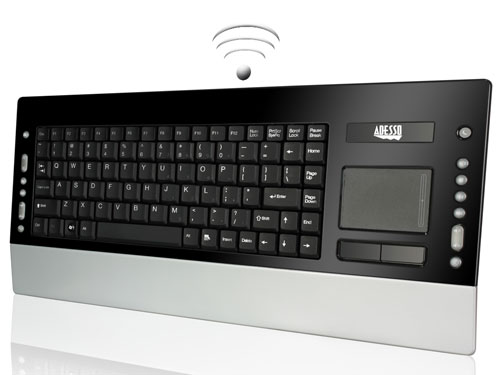
I like my Logitech keyboard, but I have wished more than one time that there were a wireless version of the Illuminated Keyboard when I am fighting with the wire to get the keyboard just where I want it. There are some uses, like for a HTPC, where wires simply won’t work. If you are looking for a nice wireless keyboard that is perfect for use from the couch, the Adesso WKB-4200UB may be perfect.

adessowkb4200ub sg

The keyboard uses 2.4GHz wireless tech with 12 channels that it can change automatically to prevent interference. Wireless range is 30 feet and the keyboard has a small USB receiver. The best feature of the keyboard for the HTPC user is that it has a two-button track pad on the right side rather than a number pad.

That means you can type and control the mouse from one device. Power comes from a pair of AAA batteries and the keyboard has a switch to turn it off when not in use. The WKB-4200UB is available now for $119.99.

Monday, 1 February 2010

Onkyo TX-SR607 Home Theater A/V Reciever Review


As a professional Home Theater installer / designer I have used hundreds of Home Theater A/V Receivers over the years. I'll keep this short and sweet and not get into tech specs.

First let me start off by saying that this is where most electronics retailers "get you". A/V Receivers and Speakers are where consumers can be guided into products that they don't need or that use antiquated technology, simply to increase profit margins for the dealer. Many A/V Receivers simply don't have the features you need for taking full advantage of all the new Home Theater components available today. DO NOT let your self get talled into an over priced Receiver because of it's brand name. Take Marantz for example: Their entry level home theater receiver at a list price of $849 only has 3 HDMI inputs. So, you connect a Blu-ray player, an HD Cable or Satellite Box and a XBox 360. Now you're out of HDMI Inputs, and when you're ready to add a new PS3 for your child's birthday you're stuck!


Enter Onkyo TX-SR607!

Excellent sound quality, SIX HDMI inputs, onboard Dolby TrueHD and DTS-HD Audio decoding and MORE. The TX-SR607's six HDMI inputs are unheard of at the price range. We've previously only seen six HDMI inputs on very high-end receivers and sound quality comparisons to a Denon AVR 3808CI receiver ($1,699 MSRP) are too close to call.

We have used almost every brand and model of A/V Receiver on the market.  You may find this hard to believe, but, this unit is almost a one fits all product. Don't get us wrong there are several reasons to use other products, the need for more power in some cases. But, for most home theater systems this one hits the nail on the head.

The bottom line: The Onkyo TX-SR607 offers a ton of HDMI connectivity and excellent sound quality for a mid range Mid priced AV receiver. You can spend more, but you have to spend much more to out-preform this product.

Samsung BD-P3600 Blu-ray Player Review


As a professional Home Theater installer / designer and have used hundreds of DVD and Blu-ray players over the years. I'll keep this short and sweet and not get into tech specs. Out of all the Blu-ray players we've used over the past year I have to say that this one preforms the best. It has all of the latest features: Excellent image quality on Blu-ray movies, Wi-Fi USB dongle included, Netflix and Pandora streaming; good operational speed and disc loading, decoding for Dolby TrueHD and DTS-HD Audio, 1GB on board memory and streams media off of your PC. All these features and it's still simple to use.I wouldn't hesitate to recommend this unit to anyone looking for a new Blu-ray player for their home theater system.

The only down fall it has is it costs almost as much as a PS3. And with a PS3 you get one of the hottest game systems available. See our review of the PS3: (coming soon)

New Home Theater Installation in Portland, TN

This is one of the newest Front Projection Home Theater Rooms we have Installed. 


See more Images on Our Facebook Profile!
Click Below for the Gallery!

Portland, TN Home Theater Installation Gallery!

Some of the components we used in this Home Theater Installation:
Call for a Consultation:
615-469-7736

New Mouse App for the iPhone - could be good for Plex

Courtesy of Engadget:

Logitech app turns your iPhone into wireless trackpad or keyboard

It ain't the first company to do it, but Logitech's new iPhone app is certainly one of the easiest to get into. Oh, and did we mention that it's completely free to download? Available now in the App Store, Touch Mouse transforms your handset into a wireless trackpad or keyboard, and thanks to its reliance on vanilla WiFi signals, you won't need any proprietary equipment to get it up and running. It's fully compatible with both Mac and PC platforms, and it's obviously a pretty fantastic way to control your HTPC without dragging a full-fledged keyboard / mouse into the living room. Hit the source link for more details, and be sure to let us know how it goes in comments once you give it a roll.

[Thanks, Wulf]